How Dash answers a question about your shop without inventing a number
What happens between 'how much did I sell yesterday?' and the answer: masking, tools that read your data with your permissions, an approval card for any change, the caps.
The Dashing team3 min read
AI assistants have a reputation problem in accounting: they sound confident and are sometimes wrong. A number that sounds right and is wrong is worse than no number. When we built Dash, the assistant inside Dashing (داشنك), the design goal was not "be smart" but "never invent a number, never act alone". This article explains how that is enforced, step by step, and what Dash still cannot do.
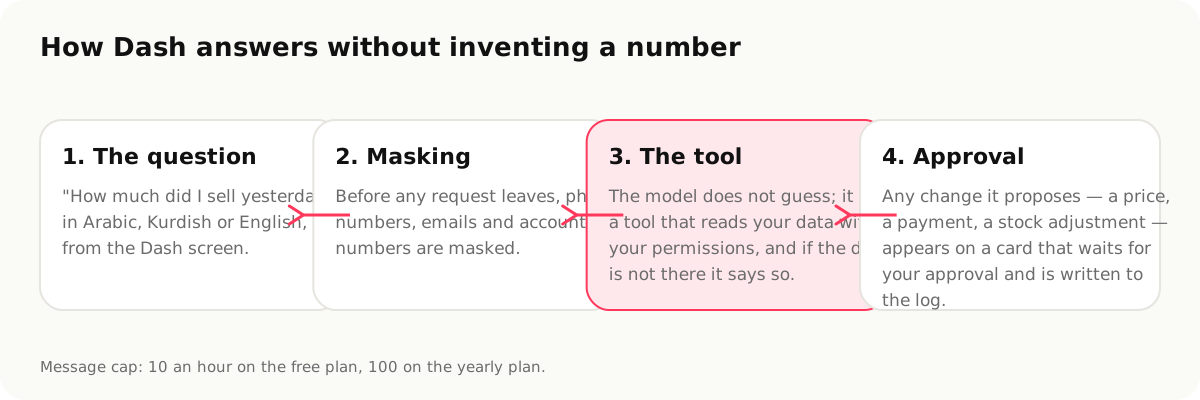
1. The question
You type in Arabic, Kurdish or English on the Dash screen: "how much did I sell yesterday?", "who has not paid for a month?", "what is about to run out?", "why did the margin drop in July?". Dash answers in the interface language you chose.
2. Masking before anything leaves
Before any request leaves for the AI model, phone numbers, emails and account-like numbers are masked. The model sees "customer C-1042 owes 450,000", not the customer's phone. Your product names and amounts are the context the model needs; your customers' identities are not.
3. Tools, not memory
The model never answers from memory or estimation. It calls a tool, a defined function that reads your data through the same permissions as the user asking. "Sales yesterday" runs the same query the sales report runs; "who has not paid" reads the same aging the customer page shows. If the data is not there, a report for a month before you joined, a branch you cannot see, the tool returns nothing and Dash says so instead of filling the gap.
Two consequences worth knowing:
- Dash respects permissions: a cashier who cannot open the profit screen cannot get the profit out of Dash either.
- Every answer is traceable: the figure in Dash's answer is the figure on the corresponding screen, so you can verify any answer by opening that screen.
4. Changes wait for you
When you ask Dash to do something, "raise the price of X to 3,000", "record 215,000 from Hajj Ahmed", "adjust the stock of Y to 12", it does not do it. It shows an approval card with the exact change. You approve or dismiss; nothing happens until you approve, and what you approve is written to the audit log under your name.
5. What Dash does every day without being asked
- A morning summary on the home screen built from six signals (yesterday's sales, margin, low stock, overdue customers, drawer variance and anomalies), each in one line.
- Cards ranked by importance, each with a button that takes you to the action.
- Anomaly detection: a negative-margin invoice, an outsized discount, an unbalanced entry, flagged before it becomes a loss.
- A 14-day cash projection with a high and low band, and the overdue card with the count and the total owed.
The caps
Messages are capped by plan: 10 an hour on the free plan, 100 on the yearly plan. The cap is there because each question costs us a model call, and a runaway loop should not be able to burn through a shop's month.
What Dash cannot do: by design
- It cannot invent a number. If it did, that would be a bug we would fix, not a feature.
- It cannot act on its own: no price changes, no payments, no deletions without an approval card.
- It cannot see what you cannot see.
- It does not work offline: the cashier does; Dash needs a connection.
- It does not send messages to your customers, and it does not read your WhatsApp.
- It is not a bookkeeper: it explains the books, it does not replace the accountant's judgement at year end.
Where your data goes
Your data stays in Dashing; only the question and the necessary context are sent to the AI model, after masking. Every AI request is recorded in its own log. The security page has the full picture, including what we have not done yet.
Sources
- Dash, https://dashing.krd/en/features/dash (accessed 2026-09-14)
- Security, https://dashing.krd/en/security (2026-09-14)
This article is also available in العربية