A cashier that sells by barcode, prints an 80 mm receipt, and works offline.
The Dashing cashier runs in the browser on any PC, tablet or phone. It reads from any barcode reader that acts as a keyboard, prints an 80 mm receipt through the browser's print dialog, and sends the receipt as a WhatsApp link. When the internet drops, sales are saved on the device and uploaded once when it returns.
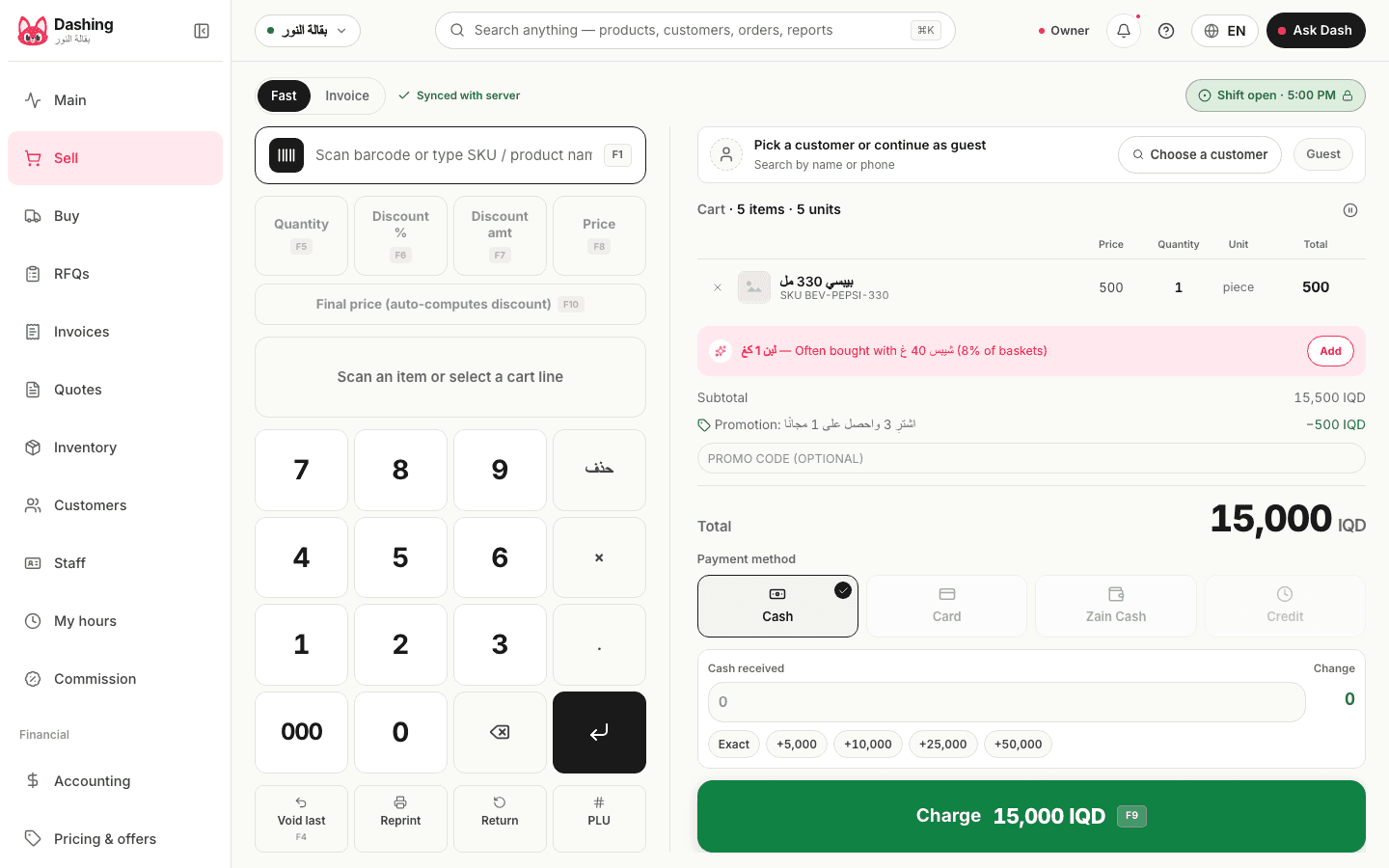
Watch it work
What you need on the counter
A device with a current browser: a Windows PC, a tablet, or an Android or iPhone. A barcode reader of the kind that types what it reads, as if it were a keyboard, over USB or Bluetooth; it needs no driver and no setup inside the software. And a thermal receipt printer with 80 mm paper, printing through the browser's print dialog. 58 mm paper is not supported, there is no customer-facing display, and scales are not connected: a weight is typed in.
What a sale can include
- A barcode scan, or a tap on a product grid with photos and a category filter
- F1 to F5 shortcuts for the most common actions, and a total large enough to read from the other side of the counter
- A discount on the line or on the whole cart, as a percentage or an amount
- Fractional quantities, and a barcode per unit: the case of water with its barcode and the single bottle with its own, with stock deducted in the base unit
- For dated stock: a batch picker at the sale that suggests the nearest expiry; an expired batch is flagged and can only be sold with an explicit, recorded confirmation
- Hold the sale while the customer goes for cash, and finish it afterwards
- Once a customer is selected, their price list and default discount apply automatically, loyalty points are earned, and a gift card can be redeemed inside the cart
- A credit sale posts to the customer's account; anyone over their credit limit is stopped, and whoever overrides it with the permission has their name and reason logged
The receipt
An 80 mm receipt with the shop's logo, address and phone, in Arabic, Kurdish or English according to the language of whoever prints it. From the invoice page you print an A4 copy or download a PDF. The WhatsApp button opens the chat with a link to the receipt page that stays valid for a year; no file is attached. The printed receipt and the PDF carry a QR to the same page, and the invoice shows when the customer opened it. A reprint is counted and written to the audit log under the name of whoever printed it; nothing is stamped on the copy.
Returns
With or without a receipt, refunded in cash or as a balance on the customer's account. A return without a receipt needs a permission and is logged under the name of whoever allowed it.
Ways to pay
Cash with the change worked out, or card recorded as its own payment method, or on credit to the customer's account. A wallet payment such as Zain Cash or Qi Card at the fast cashier is booked as cash; the separate "transfer / wallet" line exists on the invoice screen when a payment is split. Dashing does not process payments and takes no commission: the card or wallet terminal stays the bank's.
When the internet drops
Every sale is saved first to a database inside the browser on the till, then uploaded when a connection is available. Each sale carries a unique key, so it is never recorded twice however many times the upload is retried, and closing a shift waits until everything on the device has uploaded. If the server refuses a line at upload, such as an item with zero stock in a shop that does not allow negative stock, the sale goes to the recovery drawer with the reason. In the current version the fast cashier does not stop that line at scan time.
What it does not do
No scale integration (the weight is typed), no customer-facing display, no 58 mm paper, and no tables or kitchen screen for restaurants. In the current version an item with zero stock is accepted at scan time and refused at upload.
Common questions
Does the cashier work without internet?
Yes. Every sale is saved on the device and uploaded automatically when the connection returns, with a unique key per sale so none is recorded twice. What needs a connection: the financial reports, the morning brief and Dash.
Which barcode reader do I need?
Any reader that acts as a keyboard, which is the common kind, over USB or Bluetooth. No driver and no setup. We do not recommend specific models.
Does it print to a thermal printer?
Yes: an 80 mm receipt through the browser's print dialog, with the shop's logo, address and phone, in Arabic, Kurdish or English. 58 mm paper is not supported.
Can a customer buy on credit?
Yes. The sale posts to the customer's account, and you can set a credit limit; going over it needs a permission and is logged with the name and reason of whoever allowed it.
What happens when a receipt is reprinted?
Each reprint is counted on the invoice and written to the audit log with who printed it and when, so the owner can see who reprints often. Nothing is stamped on the copy.
From the blog
- An accounts program for a shop: what you need, and what is sold to youWhat an accounts program must do for a shop in Iraq: real profit, debts by name and age, the drawer, books the accountant can open. And what is sold to you, unneeded.
- Accepting Zain Cash, Qi Card and FIB at the counter: fees and bookingAccepting e-payments in an Iraqi shop: the merchant fees Zain Cash publishes, what Qi Card, FIB, SuperQi and AsiaHawala do not, and how each payment is booked in Dashing.
- Barcodes for a shop: EAN-13, in-store numbers and carton barcodesWhat a shop owner in Iraq needs to know about barcodes: what the EAN-13 digits mean, why the prefix is not the country of origin, in-store numbers, and carton vs piece.
- The 8 best accounting systems for shops in Iraq (2026)Eight accounting systems shops in Iraq use: Dashing, RA8M, Al-Ameen, Daftra, Wafeq, Zoho Books, QuickBooks, Odoo, with vendor-page prices and who each one fits.
Related
Try it in your shop, free, no card.
The free plan: the whole shop for one branch, an offline cashier with stock, debts and accounting, and no cap on selling. What it includes