An accounts program for a shop: what you need, and what is sold to you
What an accounts program must do for a shop in Iraq: real profit, debts by name and age, the drawer, books the accountant can open. And what is sold to you, unneeded.
The Dashing team6 min read
A shop owner asks for an "accounts program" and is offered an accounting package built for a contractor: journal entries, cost centres, payroll, a VAT module for a tax Iraq does not have. They buy it, and a month later they are back in the notebook, because nobody in the shop writes entries. This article is about what a shop actually needs from an accounts program, and how to recognise it during the trial, before paying. It is written by the Dashing team; where our product is the subject we say so.
The question everything starts from: who writes the entry?
In classic accounting software you write the entries: you sold, so you write a sale entry; you bought, so you write a purchase entry; you paid the rent, so you write an expense entry. That works in a company with an accountant on staff. In a clothing shop, a grocery or a phone shop there is nobody to do it, so the accounts stay empty and the notebook stays full.
The accounts program that fits a shop writes the entry itself, from the event: the cashier sells, and the sale, the cost of the goods and their leaving the stock are recorded at that moment; you receive goods from a supplier, and what you owe them is recorded; you pay the electricity from the drawer, and an expense is recorded. You never see the word "entry" unless you open the accounting section.
That is the first test. Most of the packages on the market fail it.
What it must give you, in order
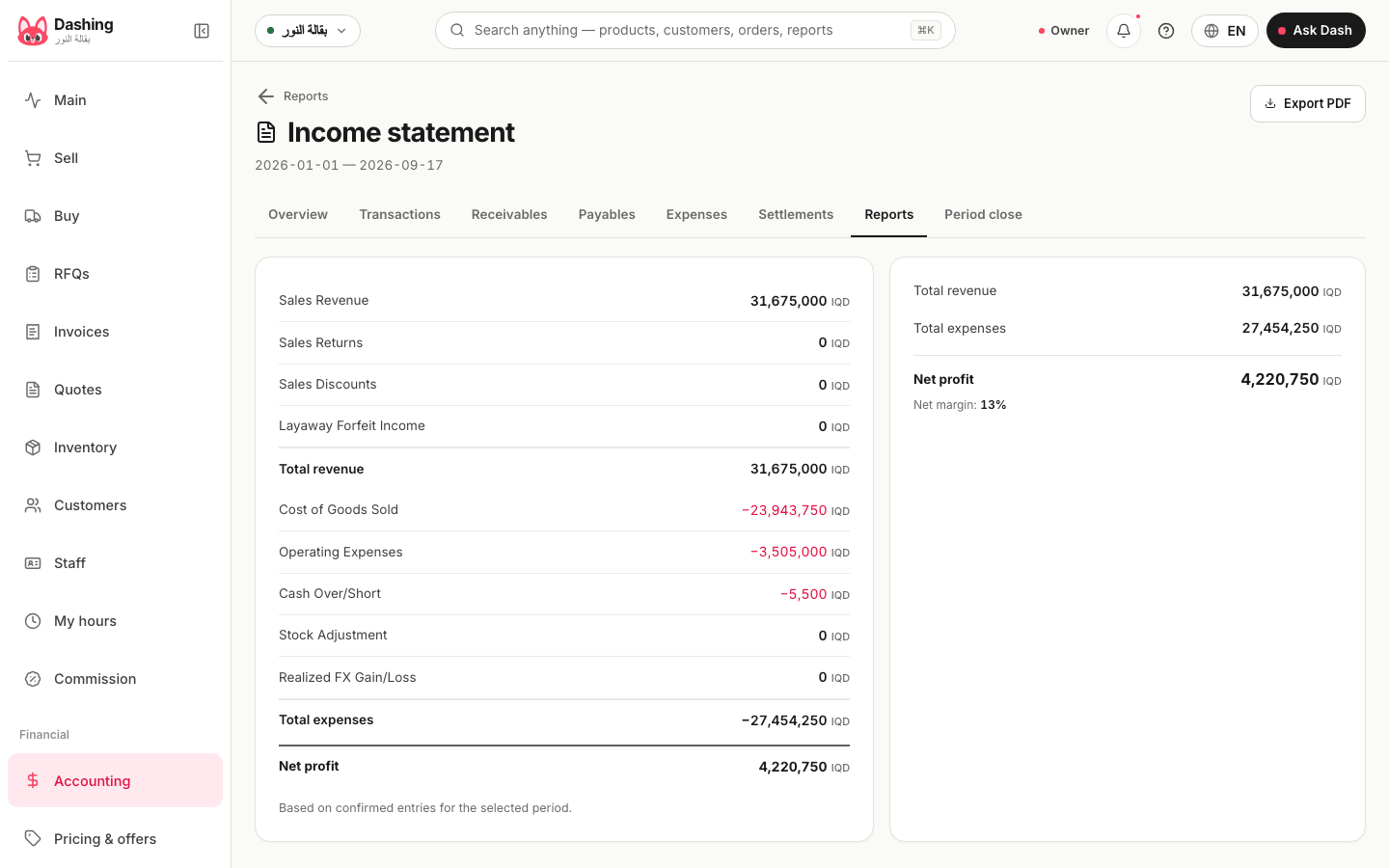
1. Real profit, not sales. Sales is a number any cashier knows. Profit is sales minus the cost of the goods sold minus expenses. A program that does not know each item's cost (its last purchase price or its average) cannot tell you what you made this month, however colourful its reports. In the trial, ask for the "income statement" of a month with both sales and purchases and look for a cost-of-goods line.
2. Debts by name and by age. Who owes, how much, since when. Customer debt is the largest sum of cash in an Iraqi shop and the one most often lost, to forgetting. A good program gives every customer a balance that moves with each invoice and each payment, sorts debts by how late they are (up to 30 days, 60, 90, more), and sends the customer a statement on WhatsApp with nothing printed. The same for what you owe suppliers.
3. The drawer. How much should be in it now, and how much is. That needs a shift opened with an amount and closed with a count, the difference booked under the name of whoever closed. Without it, the "accounts" do not know where the cash went.
4. Stock at its value. Not the number of pieces only, but what the shelf is worth at purchase cost. That figure is half your balance sheet, and it is what anyone buying or financing the shop asks about.
5. What your accountant can read. The accountant comes at month end or year end. Do they find complete books, the journal, the trial balance and the statements, or an Excel file you exported for them? The first means the program keeps accounts; the second means it keeps sales.
What is sold to you that you do not need
Payroll. A shop with three employees pays wages in cash from the drawer and books them as an expense. A payroll screen with taxes and deductions belongs to a large company.
E-invoicing and a tax link. There is no mandatory e-invoicing in Iraq today and no general VAT. A program selling you "electronic tax compliance" sells a solution to a problem that does not exist here; this article explains where things stand.
Automatic bank feeds. No Iraqi bank opens its statements to software. What exists is importing a statement and matching it by hand, which is enough for a shop that pays most of its purchases in cash.
Books in two currencies at once. Pricing in dollars and taking dinars, yes; but the books are kept in one currency. A program promising two parallel balance sheets is promising a problem at year end.
Cost centres and projects. A contractor's tool.
What must stay possible by hand
An entry that writes itself is the rule, but the accountant sometimes needs one of their own: the month's rent whose bill has not arrived, a mistake to correct, an amount moved between two accounts, an opening balance when moving over from the notebook. A program that forbids this turns every mistake into a support call. A program that allows anything turns the books into a notepad.
The middle: a manual entry with a mandatory written reason, never deleted but reversed with another entry, and refused inside a month that was locked after review. That keeps everything correctable and recorded under the name of who corrected it. In Dashing that is the "New entry" button on Transactions and "Month-end close" on Period close; the help centre walks through it.
How to test any program in an hour
- Enter five items with a purchase price and a sale price.
- Sell three of them, one on credit to a named customer.
- Record a cash expense from the drawer.
- Open the "income statement" and the "balance sheet". If cost of goods is missing from the first, or the customer's debt from the second, the program does not keep accounts.
- Ask for the customer's statement and see whether it reaches them without printing.
- Ask: does the cashier keep selling when the internet drops, and do those sales land in the same accounts when it returns?
Six passes means the books are real. Two passes means a cashier with a bigger name.
What Dashing does here
Every sale, purchase, expense and collection becomes a balanced double entry on its own, in whole dinars, and the database refuses an unbalanced one. The owner sees profit, debts and cash on one screen in shop language; the accountant opens the journal, the trial balance, the income statement and the balance sheet in the same accounting section, posts an adjusting entry with a written reason, reverses a mistake, and locks the month after review. What is not there: payroll, automatic bank feeds, e-invoicing, books in two currencies. The accounting page spells it out, and the comparison puts it next to seven other programs with their prices. The free plan starts with no card here.
Sources
- Dashing, Accounting, https://dashing.krd/en/features/accounting (accessed 2026-09-18)
- Dashing, Help centre: posting a journal entry, https://dashing.krd/en/help/post-a-journal-entry (2026-09-18) · month-end close, https://dashing.krd/en/help/period-close (2026-09-18)
- Dashing, Why there is no e-invoicing in Iraq, https://dashing.krd/en/blog/no-einvoicing-iraq-what-to-do (2026-09-18)
This article is also available in العربية · کوردی
In the product
- AccountingAccounting software for shops in Iraq: double entry that writes itself
- Customers and receivablesCustomer debts in a POS: credit limits, aging, a statement on WhatsApp
- Cashier (POS)POS software for shops in Iraq: barcode, 80 mm receipt, WhatsApp
- Free planFree accounting and cashier software for shops in Iraq
- PricingPricing: a free plan and a 420,000 IQD yearly plan