Stock per branch, by the carton or the piece, by the batch and its expiry date.
Dashing manages stock the way a shop actually holds it: a quantity per branch, the same item sold by the carton and by the piece, a batch with its expiry date, and a device with its serial number if you want one. Every movement, whether a sale, a receipt, a transfer or a count, deducts or adds in the base unit and posts its accounting entry at the same moment. You start by importing your sheet from Excel.
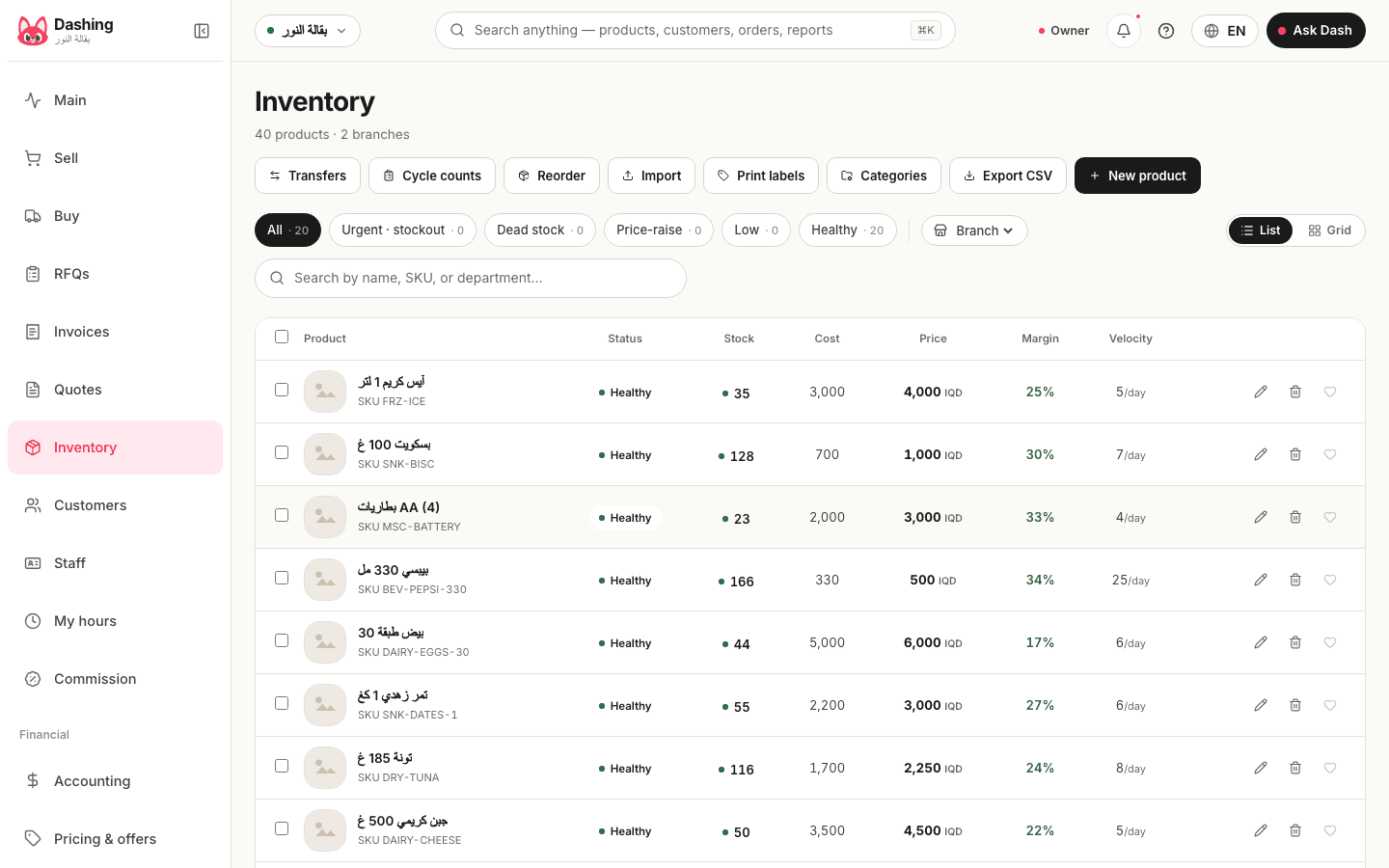
Watch it work
From Excel to Dashing
Save your sheet as a CSV file and upload it from the inventory page. Columns are recognised by their headers, in Arabic or English: "الرمز" or item_code, "الاسم" or item_name and "السعر" or sale_price are required; "التكلفة", "الكمية", "الحد الأدنى" and "الباركود" (cost, quantity, minimum stock, barcode) are optional. Before anything is saved you see how many items will be created and which rows fail. The import creates items and never edits existing ones: a code that already exists is skipped. A quantity column books opening stock to the main branch. Importing 500 items with their stock takes about 6 seconds.
The carton and the piece
One item can have several units, each with a conversion factor and its own barcode: a case of 12 bottles of water scans with its barcode and deducts 12, while a single bottle scans with its own and deducts 1; stock is always kept in the base unit. Each unit has its own price. Fractional quantities are accepted, such as 2.5 kilos of cheese or 3.5 metres of cable, with the weight typed in, since scales are not connected.
Batches and expiry dates
Every receipt is recorded as a batch with its expiry date. At the sale the cashier suggests the batch closest to expiry; an expired batch is flagged and can only be sold with an explicit confirmation, recorded under the name of whoever confirmed it. A home-screen card lists what expires within 30 days, and that window can be changed in Settings. Batches are switched on only for the items that need them.
Branches and transfers
- An independent quantity per branch, with cost of goods sold computed per branch
- Transfers between branches: created, then "in transit", then received or cancelled; the system suggests a transfer itself when an item runs out in one branch and sits unsold in another
- A minimum per item: when the quantity reaches it, the item appears on the low-stock list and on a home-screen card, and a draft purchase order is one tap away
Counts and adjustments
A cycle count records what is on hand item by item while selling continues, and the difference is posted as an accounting entry after approval. In the current version the count works on the item's total quantity, not per branch. A manual adjustment (damage, loss, correction, restock) posts an entry and is logged in the audit log with who made it and when. There is no screen listing a single item's movements; the audit log keeps adjustments, counts and transfers, and Dash answers "what moved this item?" in the chat.
Variants and serial numbers
A shirt in its sizes and colours: a parent product with variants entered one row at a time (name, code, price, opening quantity), and each variant sells at the cashier as its own item by its barcode or from the grid; there is no tool that generates variants from a size-and-colour table. Devices are tracked by serial number or IMEI from receipt through sale to return, once tracking is switched on in Settings. Photos appear on the cashier grid and the item page.
What it does not do
No bills of materials or recipes, no online storefront, no scale integration, no per-item movement screen, no variant generator. The cycle count works on the total quantity, not per branch. The import creates items and does not update them.
Common questions
Does it track expiry dates?
Yes, by batch: each receipt with its expiry date, the cashier proposes the nearest expiry at the sale, and a home-screen card shows what expires within 30 days.
How do I bring my current stock from Excel?
Save the sheet as CSV with Arabic or English column headers (code, name, price, and optionally cost, quantity and barcode), upload it from the inventory page, check the preview, then save. The quantity column becomes opening stock for the main branch.
Can I sell by the kilo and by the carton?
Yes. Define the units and the conversion once; each unit has its own barcode and price, and stock is deducted in the base unit. The weight is typed in.
Can I see one item's movements?
Not on a dedicated screen yet. The item page shows its stock per branch, its sales and its purchase history from suppliers; adjustments, counts and transfers are in the audit log; and Dash answers "what moved this item?" in the chat.
From the blog
- Barcodes for a shop: EAN-13, in-store numbers and carton barcodesWhat a shop owner in Iraq needs to know about barcodes: what the EAN-13 digits mean, why the prefix is not the country of origin, in-store numbers, and carton vs piece.
- Cashier software in Iraq: the complete guide for shops (2026)What cashier software must do in Iraq: hardware, working offline, dinar and dollar, debts on WhatsApp, Zain Cash and Qi, real prices, how to choose, with dated sources.
- From the notebook and Excel to a cashier system in a weekA day-by-day plan for moving a shop in Iraq from the notebook and Excel to Dashing: products, customers, old debts, first sale, shift and report, and what stays behind.
- Running two branches or more: stock, drawer and profit per branchWhat changes when a shop in Iraq opens a second branch: stock per branch, suggested transfers, a drawer per branch, profit for all or per branch: no per-branch fee.
Related
Try it in your shop, free, no card.
The free plan: the whole shop for one branch, an offline cashier with stock, debts and accounting, and no cap on selling. What it includes