Running two branches or more: stock, drawer and profit per branch
What changes when a shop in Iraq opens a second branch: stock per branch, suggested transfers, a drawer per branch, profit for all or per branch: no per-branch fee.
The Dashing team3 min read
A second branch doubles sales in theory and doubles the questions in practice: where is the stock? who took from the drawer? which branch actually makes money? Many systems answer by mixing everything into one pool and then charging you per "location". This article explains what should stay separate per branch and what should be combined, and how Dashing (داشنك) does it.
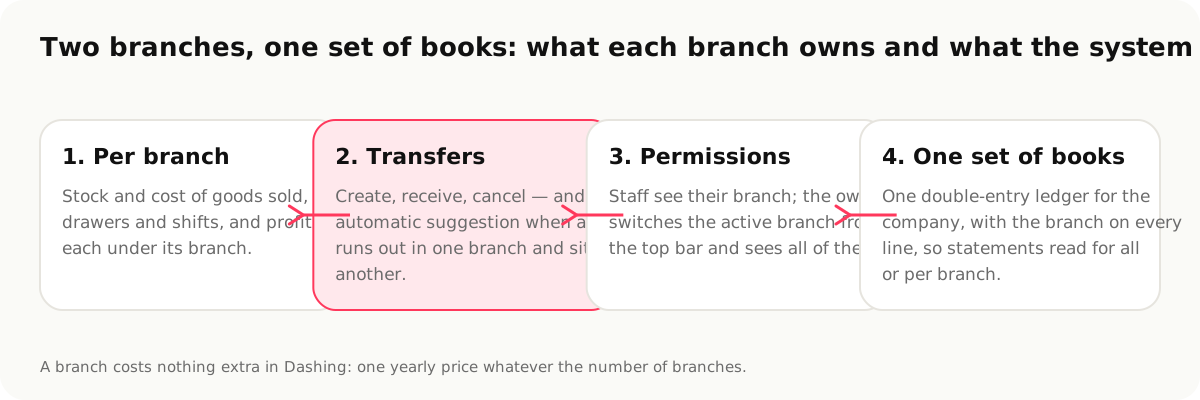
The rule: what belongs to the branch stays with it; the books are one
One company, one set of books: one income statement and one balance sheet. But inside the books, every line knows its branch. That gives you both: the whole company's profit, and each branch's profit on its own, from the same entries rather than two parallel spreadsheets.
1. Stock: a quantity per branch, a cost per branch
In Dashing every branch has its own stock; a quantity sold in a branch is deducted from that branch, and cost of goods sold is computed per branch. When a branch receives goods from a supplier, they enter its own stock. And the reorder point per item works per branch.
2. Transfers between branches
A transfer is a three-step process: create in the sending branch, receive in the receiving branch, or cancel. The quantity is charged to nobody between the two steps: it leaves the first and does not enter the second until receipt is confirmed, so no goods get lost "on the way".
And the part that actually saves time: when an item runs out in one branch and is available in another, the system suggests the transfer automatically on the home screen. One tap creates it.
3. A drawer and a shift per branch
The shift belongs to the drawer, and the drawer belongs to the branch. Every branch has its own opening cash, count, variance and report, and from the Settlements screen you see every branch's closes in one place. Closing the drawer every day explains the cycle.
4. Staff: everyone sees their branch
A staff member is attached to their branch and sees its screens and data; the owner switches the active branch from the top bar and sees all or one. Per-screen permissions stay as they are, and the audit log records the branch with every action.
5. Profit: for all, or per branch
Reports read for the whole company or one branch: sales, cost of goods, the expenses tied to the branch, and profit. An expense that belongs to a branch (its rent, its electricity) is recorded on that branch and shows in its profit; a shared expense stays at company level.
The price
In Dashing there is no per-branch fee: one yearly plan (420,000 IQD) whatever the number of branches and users. Compare that with systems that charge 10,000 IQD a month for each extra branch, or dollars per "location"; what cashier software costs in Iraq lays out the numbers with dates.
When you do not need "branches"
A kiosk in front of the same shop, or a table at a two-day fair, does not need a branch; an extra device on the same branch is enough, with one shift. A branch is for a place with its own stock, drawer and staff.
What Dashing does not do
- It does not allocate shared expenses across branches by percentage automatically; an expense is on the company or on a branch.
- No automatic different prices per branch from Settings; special price lists apply to customers and groups.
- No central warehouse with its own distribution logic; a warehouse is a branch like any other from which goods are transferred.
Sources
- Branches in Dashing, https://dashing.krd/en/features/multi-store (accessed 2026-09-14)
- RA8M pricing (10,000 IQD a month per extra branch), https://www.ra8m.com/pricing (2026-09-14)
This article is also available in العربية