A cashier that works without internet: how it actually works
What 'offline' really means in cashier software, how Dashing saves sales on the device and uploads them exactly once, and what does not work offline: said plainly.
The Dashing team5 min read
"Works offline" is written on many boxes. It means different things, and the difference shows up at 6 am on an exam morning, when the internet across most of Iraq is switched off on schedule and the first customer of the day is standing at the counter.
This article explains what happens inside Dashing (داشنك) when the connection drops, in enough detail that you can compare it with any other system, and it lists what does not work offline, because that is the part vendors leave out.
Why this matters more in Iraq than elsewhere
Iraq's Ministry of Communications has ordered the internet cut nationwide during school exams every year; Internet Society Pulse counted more than 80 such shutdowns in the two years to May 2025, typically from 6:00 to 8:00 on exam days, with a second wave in late August and September. Add the everyday cuts, power, a provider's line, a router, and "the internet is down" is a normal Tuesday for a shop, not a disaster.
Three things that are all called "offline"
1. Cloud-only with a spinner. The application is a web page that talks to a server for every action. When the network is gone, the sell button waits. Some products cache the product list so the screen looks alive, but the sale cannot be saved. Ask: "Where is the sale stored while the internet is down?" If the answer is "it isn't", this is the category.
2. A local server in the shop. A PC in the back room runs the database; the tills talk to it over the shop's own network. This genuinely works without internet, and the whole business record lives on one hard drive, with backups only if someone remembers. A second branch means a second island.
3. Offline-first. Every till keeps its own local store of what it needs (the catalogue, prices, the cart) and its own queue of what it has done (the sales). The server is the source of truth, but the till does not need it right now. When the network returns, the queue drains automatically. This is how Dashing works.
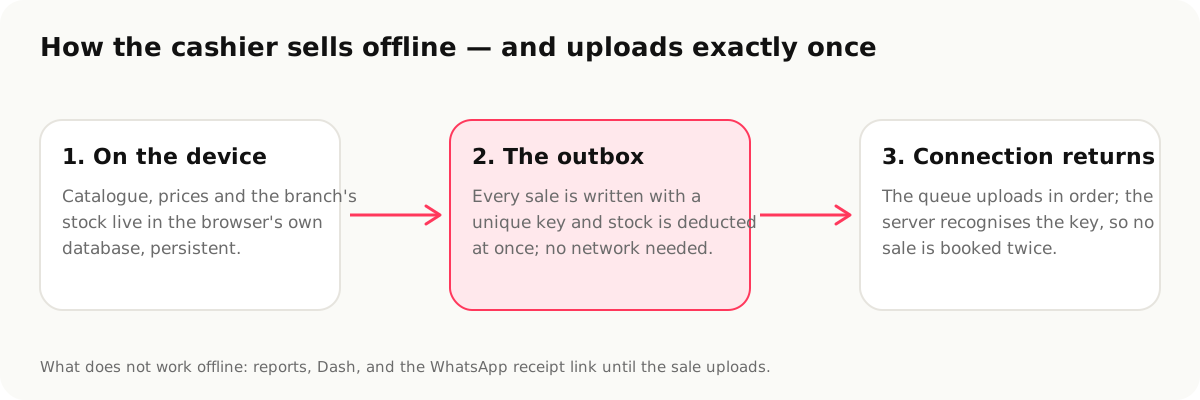
What happens inside Dashing, step by step
Before the outage. Each time the till is online it refreshes its local copy of the catalogue (products, barcodes, units, prices, and the branch's stock levels) into the browser's own database on the device (not a cookie, not a cache that the browser is free to throw away: the app asks the browser for persistent storage so the data survives restarts and low disk space).
During the outage. The cashier scans, discounts, holds and resumes carts, takes payment, prints the 80 mm receipt through the operating system's print dialog. Each completed sale is written to an outbox on the device with a unique key generated on the till. Stock on the device is reduced immediately so the next sale sees the right quantity. Nothing on screen tells the cashier to wait; a small indicator shows "saved on this device, not yet uploaded".
When the connection returns. The outbox is uploaded in order. Each sale carries its unique key as an idempotency key, so if the upload is interrupted halfway and retried, the server recognises the sale it already has and does not book it twice. Two hundred sales made during a two-hour shutdown arrive as two hundred sales, not 199, not 201. Once the server confirms, the sale moves from "on this device" to "synced", and the stock and the books are exactly what they would have been had the shop been online all along.
If the device is closed before it syncs. The outbox is on disk; it uploads the next time the app opens with a connection. If two tabs or windows are open, only one drains the queue at a time, so nothing is sent twice.
What does not work offline: plainly
- Reports, the accounting screens and Dash (the AI assistant) need the server. The cashier keeps selling; the owner's dashboard waits for the connection.
- The WhatsApp receipt link is created by the server, so an offline sale gets its shareable link when it uploads. The paper receipt prints regardless.
- Closing the shift is blocked while sales from that shift are still unsynced, and that is deliberate. A Z-report that does not include every sale is worse than a late one.
- A new product that was never synced to the till cannot be sold by barcode until the till has seen it once online.
- The device must keep its browser data. "Clear browsing data" on a till that has unsynced sales is the one way to lose them. We ask for persistent storage, and the app warns when storage is nearly full, but the button exists.
How to test any vendor's claim in five minutes
- Open the sell screen, then turn off Wi-Fi on the device.
- Make three sales, one with a discount, one on credit.
- Print a receipt.
- Close the app completely. Reopen it: the three sales should still be there, marked as not uploaded.
- Turn Wi-Fi on. Wait. Check the server's sales list: three sales, once each.
If any step fails, you have found out in the shop, not on exam morning.
Sources
- Internet Society Pulse, Iraq to Shutdown Internet During 2025 Exam Period, https://pulse.internetsociety.org/en/blog/2025/05/iraq-to-shutdown-internet-during-2025-exam-period/
- NetBlocks, Iraq shuts down internet to prevent cheating in national science exams, https://netblocks.org/reports/iraq-shuts-down-internet-to-prevent-cheating-in-national-science-exams-gBLk94A4
- Dashing, Works offline, https://dashing.krd/en/features/offline
This article is also available in العربية · کوردی