Customer debts: collecting them over WhatsApp without awkwardness
Running credit sales in a shop in Iraq: a credit limit per customer, debt aging, a statement that reaches the customer on WhatsApp, and the overdue card every morning.
The Dashing team4 min read
In Iraq shops sell on credit because the customer is a neighbour, and you do not ask a neighbour for a card. The problem is not the debt itself; the problem is that the notebook does not know who is late, by how much, and since when, and cannot remind anyone without embarrassing the shop owner. This article explains how credit sales are run with a system, how Dashing (داشنك) does it specifically, and where its limits are.
Why the notebook fails after six months
The notebook records the debt but not its age. After six months the page is a list of names and numbers without dates, so you do not know whether Hajj Ahmed's balance is from last month or last winter, or which customer deserves a call today. And when you ask, the owner gets asked back: "where does this number come from?", with no answer except the notebook itself.
A good system solves three problems in order: it stops the debt from ballooning, it knows the age of every dinar, and it sends a detailed statement that leaves no room for argument.
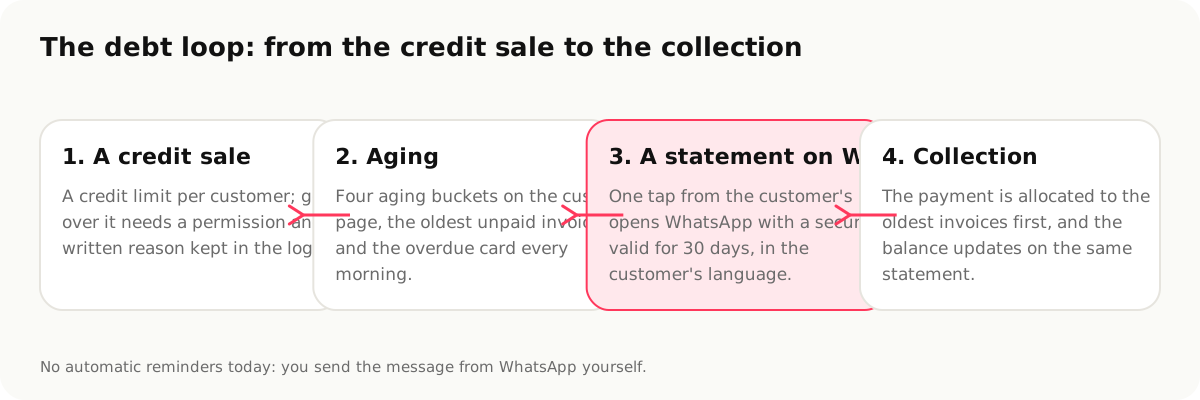
1. A credit limit per customer
In Dashing every customer has a credit limit. When a credit invoice would exceed it, the sale stops, unless the staff member has the override permission, in which case they write a reason that is kept in the audit log under their name. This does not stop you from being generous with a good customer; it only stops generosity from happening without your knowledge.
Set the limits to your reality: the neighbourhood customer who settles every month deserves a higher limit than a passer-by, and the limit can be changed from the customer's page at any time.
2. Aging: how old is each dinar?
The customer's page shows their debt in four aging buckets with the oldest unpaid invoice. This turns "he owes 462,500" into "he owes 462,500, of which 318,000 is more than 60 days old", and that difference decides who you call today.
For the whole shop, the home screen shows a card every morning for customers more than 30 days late: how many, and the total they owe, with a button that opens the receivables list, where you sort them by amount or by age. Deciding whom to call first is yours; Dashing gives you the list and the ages.
3. A statement that arrives on WhatsApp
The step that changes the relationship: instead of "you owe an amount", the customer receives a statement with their invoices, payments and balance, in their language (Arabic, Kurdish or English) as a secure link valid for 30 days. From the customer's page you tap "Share", WhatsApp opens with a ready message, and you send it.
The link shows the same details you see: every invoice with its date and lines, every payment, and the balance. There is no room for "where does this number come from?".
A practical tip: send the statement at the end of every month to every customer with a balance, even those who are not late. A monthly statement makes the reminder a habit rather than an event.
4. Collection and allocating the payment
When a customer pays part of the debt, you record the payment from their page and it is allocated to their invoices oldest first, so the aging shrinks automatically and the balance updates on the same statement. The payment goes into the open shift's drawer, appears in its close report, and is booked in the ledger as a double-entry journal entry without you touching anything.
What Dashing does not do: on purpose
- No automatic reminders. No messages go out to your customers by themselves; the message leaves your phone with your tap. We believe an automated reminder from an unknown number ruins a relationship built over years.
- No late interest and no computed penalties. Debt in an Iraqi shop carries no interest, and the system does not invent one.
- No import of old customer balances from a file. Names and phones import from CSV; an old balance is entered by hand, or stays in the notebook until it is collected. From the notebook and Excel to a system in a week explains both options.
The weekly checklist
| Day | What you do | Where |
|---|---|---|
| Saturday | Review the overdue card and the receivables list by age | Home screen |
| Saturday | Send a statement to the first five | Customer page → Share |
| Wednesday | Record the payments that came in | Customer page → Collect payment |
| Last day of the month | A statement to every customer with a balance | Customer page → Share |
| Last day of the month | Review the limits: who earned a raise, who a cut | Customer page |
Sources
- Customers and receivables in Dashing, https://dashing.krd/en/features/customers (accessed 2026-09-14)
- World Bank, account ownership in Iraq (30.2% of adults, 2024), https://data.worldbank.org/indicator/FX.OWN.TOTL.ZS?locations=IQ
This article is also available in العربية · کوردی
In the product
- Customers and receivablesCustomer debts in a POS: credit limits, aging, a statement on WhatsApp
- AccountingAccounting software for shops in Iraq: double entry that writes itself
- Grocery & supermarketGrocery and supermarket POS in Iraq: cartons, weight, expiry
- Mobile phone shopsMobile shop software: IMEI, repairs and installments